How to stop emails from Quora
Quora has no single off switch for email. Turn off each type in Settings, Email & Notifications, including the Quora Digest. Here is where each one is.
By Emmett Miller
To stop emails from Quora, open Settings, choose Email & Notifications, and switch off each type of email you get. Quora has no single switch that turns off all of its email, so you have to go down the list. The one most people want gone, the Quora Digest, is under From Quora.
Turn off Quora emails on a computer
These steps match Quora's settings as of November 2026.
- On quora.com, click your profile picture at the top right, then Settings.
- Click Email & Notifications in the left column.
- Switch off every email you don't want. Each switch says what it sends, such as "Email me when there are new answers to questions I asked or follow."
- Scroll to From Quora and switch off Quora Digest.
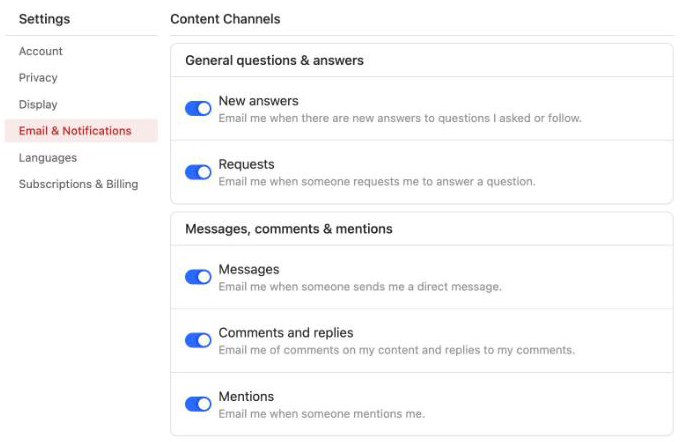
The switches are grouped into sections, top to bottom: General questions & answers, Messages, comments & mentions, Spaces, Your network, Activity on Your Content, From Quora and Things you might like. Work down every section, since each one can send mail on its own.
- General questions & answers covers new answers to questions you asked or follow, and requests to answer.
- Messages, comments & mentions covers direct messages, comments and replies, and mentions.
- Spaces covers Space invites, Space updates and suggested Spaces. Under Spaces you follow, the Manage button sets how often each Space emails you.
Turn off the Quora Digest
The Quora Digest is the email of answers Quora picks for you. It has its own switch, Quora Digest, under From Quora on the same Email & Notifications page. Turning off answer or comment emails does not stop it.
Turn off Quora emails in the app
Quora's help page on notifications and emails gives these steps for the app:
- Tap your profile icon at the top left.
- Tap Settings, then Email & Notifications.
- Choose Email, and switch off the types you don't want.
Emails that are not on the settings page
The same help page warns that not every type of Quora email appears in Email & Notifications. For one of those, open the email and use the unsubscribe link at the bottom. Quora's help center has a separate article, "How do I unsubscribe from Quora emails?", for these.
Block Quora in your mail app
If you would rather not go switch by switch, send Quora's mail to Spam or Junk from your mail app. Block the whole quora.com domain rather than one address, so you catch every address Quora sends from. That also catches password resets, so unblock it if you ever lose access to your account. The steps for Gmail, Outlook and Apple Mail are in how to block a sender. For mail from stores and other apps, see how to stop marketing emails.
Stop it in Alrighty
Alrighty, a desktop mail app, lists every mailing list that sends you mail, with how often each one sends. You leave a list with one click, without opening an email or hunting for the link at the bottom. If a list keeps sending after you leave, Alrighty moves it to Junk for you. See how it works on the features page, or download Alrighty.
Questions
Is there a way to turn off all Quora emails at once?
Not on the settings page. Quora's Email & Notifications page has a switch for each type and no single switch for all of them, so you have to turn each one off. The alternative is blocking the quora.com domain in your mail app.
Why do I still get Quora emails after turning them all off?
Quora's help center says not every type of email appears in Email & Notifications. For those, use the unsubscribe link at the bottom of the email itself. Also check you changed the settings on the Quora account that uses the address the mail arrives at.
How do I stop the Quora Digest?
Switch off Quora Digest under From Quora in Settings, Email & Notifications. It is separate from the answer, comment and Space emails, so turning those off does not stop it.
Does deleting the Quora app stop the emails?
No. Your email settings belong to your Quora account, not to the app on your phone, so the mail keeps coming. Change them in Settings, or deactivate the account if you are done with Quora.