How to stop emails from Facebook
Set Facebook's email frequency to Required notifications, then turn off the types you don't want. Here is where those settings are, and what still gets through.
By Emmett Miller
To stop most emails from Facebook, open Settings & privacy, go to Notifications, open Email under "Where you receive notifications", and set Email Frequency to Required notifications. Facebook will still email you about your account, security, privacy and Pages you manage, and nothing else.
That one setting does most of the work. The rest of this page covers the finer controls, the mail you cannot turn off, and how to stop Facebook mail from your mail app instead.
Turn off Facebook emails on a computer
These steps match Facebook's settings as of November 2026.
- On facebook.com, click your profile picture at the top right.
- Choose Settings & privacy, then Settings.
- In the left column, under Preferences, click Notifications.
- Scroll to Where you receive notifications and click Email.
- Under Email Frequency, pick one of three:
- All: every notification, except the ones you turn off.
- Suggested: what Facebook thinks you want. This is the default.
- Required notifications: only mail about your account, security, privacy and Pages you manage.
- Below that, under Your Email Notifications, switch off any type you still get, such as Tags, Birthdays or Groups.
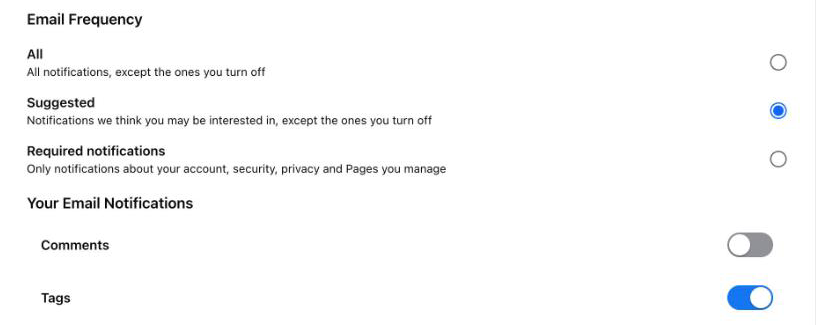
Facebook saves each change as you make it. Its Help Center puts it plainly: if you turn off notifications entirely, you stop getting email notifications.
Turn off one type of Facebook email
Every type of notification has its own row at the top of the same Notifications page, under What notifications you receive. Each row lists where it reaches you, such as "Push, Email, SMS". Open a row to switch off email for that type alone. This is how you keep, say, message alerts by email while dropping birthdays and People You May Know.
Stop Facebook emails without an account
Facebook sometimes emails people who never signed up, for example after a friend uploads their contacts. Facebook's Help Center says to click Unsubscribe at the bottom of the email to opt out.
What Facebook still sends
Required notifications cannot be turned off. They cover sign-in alerts, password changes, privacy changes and mail about Pages you manage. Facebook sends notices like these from facebookmail.com, which Meta names as one of its sending domains for sign-in and password alerts.
Block Facebook in your mail app
Blocking sends Facebook's mail to Spam or Junk without changing anything on Facebook. Block facebookmail.com as a domain to catch everything, or block single addresses if you still want the security alerts. The steps for Gmail, Outlook and Apple Mail are in how to block a sender. For mail from stores and other apps, see how to stop marketing emails.
Stop it in Alrighty
Alrighty, a desktop mail app, lists every mailing list that sends you mail, with how often each one sends. You leave a list with one click, without opening an email or hunting for the link at the bottom. If a list keeps sending after you leave, Alrighty moves it to Junk for you. See how it works on the features page, or download Alrighty.
Questions
Why do I still get Facebook emails after turning them off?
Check Email Frequency first. On Suggested or All, Facebook keeps sending any type whose switch is still on. Set it to Required notifications, and what still arrives should only be about your account, security, privacy or Pages you manage. Those cannot be turned off.
Which email address does Facebook send notifications to?
Your primary email. Facebook's Help Center says that if more than one address is linked to your account, notifications go to the primary one. You can change which address is primary on the same Email settings page.
Is an email from facebookmail.com real?
The domain is real: Meta uses facebookmail.com for sign-in and password alerts. But scammers copy Facebook's look and use addresses that look close to it. If an email asks you to sign in or reset a password you didn't ask about, open Facebook yourself instead of clicking the link.
Does turning off email stop Facebook notifications in the app?
No. Email is one place notifications reach you, alongside push, SMS and the browser. The Email setting changes only what arrives in your inbox. Push and SMS have their own settings under "Where you receive notifications".