How to stop emails from LinkedIn
LinkedIn sets email per type of notification. Open Settings & Privacy, Notifications, pick each category, and switch Email off. Here is where each one is.
By Emmett Miller
To stop emails from LinkedIn, open Settings & Privacy, click Notifications, and open each category. Inside a category, open each type of notification and switch Email off. LinkedIn has no single switch for all of its email, so you go category by category. A category's top switch turns off every notification in it, in the app as well as by email.
Turn off LinkedIn emails on a computer
These steps match LinkedIn's settings as of November 2026.
- Click the Me icon at the top of your LinkedIn homepage, then Settings & Privacy.
- Click Notifications in the left column.
- Click a category, such as Searching for a job.
- Click a type of notification in that category, such as Job recommendations.
- Under Choose where you get notified, switch Email off.
- Click Back and repeat for each type that still lists Email.
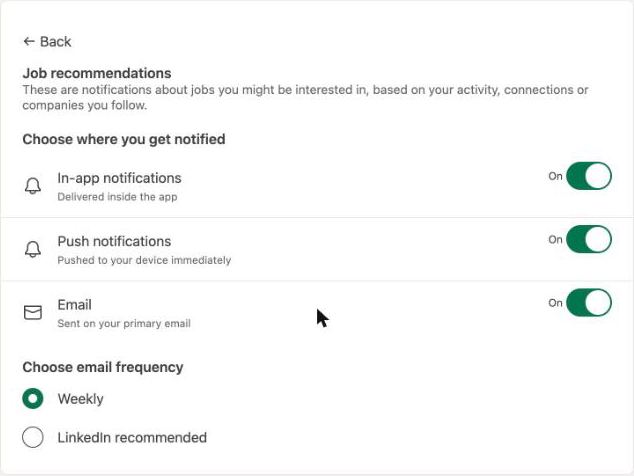
Each category page lists its types with the channels they use, such as "Push, In-app and Email". You only need to open the ones that say Email.
The categories are Searching for a job, Hiring someone, Connecting with others, Network catch-up updates, Posting and commenting, Messaging, Groups, Pages, Attending events, News and reports, Updating your profile, Verifications, Games and Advertising your business.
Get fewer LinkedIn emails instead of none
Some types let you set how often they email. Under Choose email frequency, Job recommendations offers Weekly or LinkedIn recommended. Weekly sends one email a week instead of one each time LinkedIn finds a match. Use this if you still want job alerts but not every day.
Turn off a whole category
At the top of each category is a switch such as Allow job search notifications. Switching it off stops that category's notifications everywhere: email, push and in-app. Use it for categories you never want, such as Games or Network catch-up updates.
Unsubscribe from one LinkedIn email
LinkedIn's help page Manage emails from LinkedIn says you can also click the Unsubscribe link in the footer of an email, "wherever applicable". This stops that one type of email without opening settings. A LinkedIn newsletter you subscribed to also has an Unsubscribe link at the bottom.
Stop LinkedIn invitation emails if you don't have an account
Invitations to join LinkedIn come from members who uploaded your address. If you are not a member, LinkedIn's help page Stop invitation emails to join LinkedIn says to use the Unsubscribe link in the footer of the invitation. You do not need an account to do this.
Block LinkedIn in your mail app
If you don't want to go through every category, send LinkedIn's mail to Spam or Junk from your mail app. Block the whole linkedin.com domain rather than one address, because LinkedIn sends job alerts, messages and invitations from different addresses. That also blocks sign-in codes and password resets, so unblock it if you need to get into your account. The steps for Gmail, Outlook and Apple Mail are in how to block a sender. For mail from stores and other apps, see how to stop marketing emails.
Stop it in Alrighty
Alrighty, a desktop mail app, lists every mailing list that sends you mail, with how often each one sends. You leave a list with one click, without opening an email or hunting for the link at the bottom. If a list keeps sending after you leave, Alrighty moves it to Junk for you. See how it works on the features page, or download Alrighty.
Questions
Is there a way to turn off all LinkedIn emails at once?
No. LinkedIn sets email per type of notification, so you switch Email off in each category under Settings & Privacy, Notifications. The quickest alternative is blocking the linkedin.com domain in your mail app.
Why do I still get LinkedIn emails after changing my settings?
Check that every type that lists Email is off, in every category. Also check that you changed the account that uses the address the mail arrives at. Emails about your account, such as sign-in codes, are not on the Notifications page.
Does turning off LinkedIn emails turn off app notifications too?
No. Each type has separate switches for in-app notifications, push notifications and email. Switching off Email leaves the other two on. The switch at the top of a category turns off all three.
How do I stop LinkedIn job alert emails?
Open Searching for a job under Notifications, then open each type that lists Email, such as Job recommendations, and switch Email off. To get fewer instead, set the frequency to Weekly.